Title here
Summary here
Note
This feature is still experimental and may require more testing before you commit to using it in your own projects. Please get in touch via Discord if you require support with your project.
There are features planned to be added over the next few months including Predictive Interpolation mode and better integration with GAS Gameplay Cues. Check out the roadmap to see the newest planned features and if there’s anything missing, request it on the Discord!
Chaos Networking is Epic’s newest networking solution to bring predictable, server-authoritative gameplay to any Unreal Engine game. The huge benefit to using this over the Network Prediction Plugin is that once you’ve set up your project properly, replicated physics “just works”. Gunsmith has support for switching out the networking backend, similar to the how the Mover component works which means you can add networked physics to your own games too!
Caution
Due to Chaos still being in development, Gunsmith only supports networked physics in Unreal Engine 5.7 or newer. The example project will be developed in 5.8 so will have the most support. Older projects will need to update before being able to use this.
All logic that happens inside the simulation now gets executed on the physics thread. This means that you need to take extra care when using the plugin as any functionality that requires the game thread (such as spawning an object) now requires extra thought. While Gunsmith should handle most logic out of the box, extending this functionality may be more difficult than changes to the NPP backend.
Any cosmetic logic that doesn’t affect the physics simulation in any way can be pushed to the next game thread update with IGSBackendLiaisonInterface::QueueCosmeticEvent. It’s also possible to override IGSNetworkDriverInterface::FinalizeFrame as that will also be called on the game thread.
There are a few steps to take before you can use networked physics in your own project.
The first is to set up the project settings so that predicted physics is enabled. Set this to true at Engine->Physics->Enable Physics Prediction. You should also set bTickPhysicsAsync to true here.
You can update your physics tick rate here with the AsyncFixedTimeStepSize param. This is the length of a single tick so setting the value to 0.016667 will be approximately equivalent to 60fps.
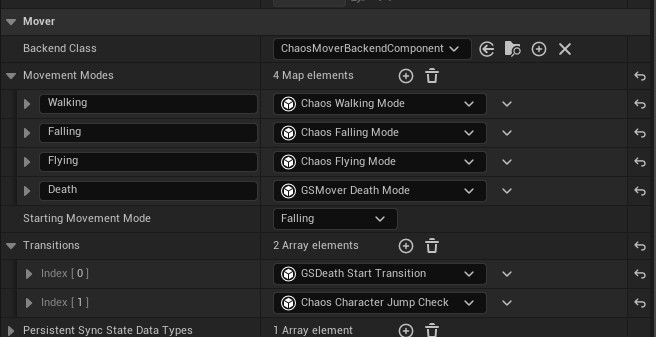
To ensure that characters are moving in the physics thread, the BackendClass on your characters Mover Component must be set to ChaosMoverBackendComponent. Each of the movement modes also need to be changed to the equivalent Chaos version. These work slightly differently to the original movement modes so you may have to update speed values to get a similar result. You may also need to either use the UChaosCharacterMoverComponent or copy functionality over to your own Mover Component.
Rather than having jump built into the walking state, it’s now a standalone transition. Add ChaosCharacterJumpCheck and any other relevant transitions to your component.
As the Gunsmith implementation of the swappable backends uses Mover as inspiration, you will also need to update a few Gunsmith components in the same way. These components are:
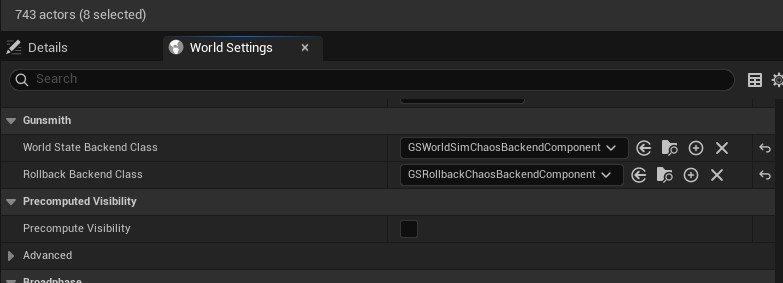
GSWorldSimNetProxy and GSRollbackNetProxy are dynamically spawned objects so these will not be editable via Blueprint. Instead, override UGSWorldStateSubsystem::GetBackendLiaisonClass_Implementation and UGSWorldStateSubsystem::GetRollbackBackendLiaisonClass_Implementation and return the required classes.
Alternatively, set your project to use GSWorldSettings by adding the following line to DefaultEngine.ini. The backend classes can then be set via the World Settings tab in the editor:
[/Script/Engine.Engine]
WorldSettingsClassName=/Script/Gunsmith.GSWorldSettings
As it’s not currently possible to spawn objects on the Physics thread, you will be required to pre-spawn your objects via Gunsmith’s Pooling System. I expect this to be possible in a later version of Gunsmith.
The final step is to add physics impulses to any weapons that you’re using. This impulse must be triggered on the physics thread so ensure it is called via projectile states/damage formats directly or through an emitters SimulationTick.
void UKnockbackDamageFormat::DamageTarget(const FHitResult& InitialHit, const FVector& DamageLocation, AActor* HitActor,
                                                  const FGSRadialDamageDealt& DamageInfo, int32 Frame, AActor* Instigator, AController* InstigatingController,
                                                  const FGSDamageFormatDebugSetup& DebugSetup, float CustomMultiplier, bool bShouldReapplyOnReconcile,
                                                  EGSDamageApplicationMode DamageApplicationMode)
{
  Super::DamageTarget(InitialHit, DamageLocation, HitActor, DamageInfo, Frame, Instigator, InstigatingController, DebugSetup,
                      CustomMultiplier, bShouldReapplyOnReconcile, DamageApplicationMode);

  UPrimitiveComponent* PhysicsComponent = FindSimulatingComponent(HitActor, DamageInfo.HitResult.GetComponent());

  if (!PhysicsComponent)
  {
    return;
  }

  FVector HitVector = DamageInfo.HitResult.Location - DamageLocation;
  const FVector HitVectorNormalized = HitVector.GetSafeNormal();
  const float HitRadius = OuterDamageRadius.GetModifiedValue();
  const float HitStrength = HitVector.Size() / FMath::Max(HitRadius, 0.01f);
  const float LaunchStrength = LaunchPower.GetValue(1.0f - HitStrength);

  const FVector TargetUpVector = FVector::UpVector;
  const FQuat RotationBetween = FQuat::FindBetween(TargetUpVector, HitVectorNormalized);
  const float AngleBetween = RotationBetween.GetAngle();

  // Ensure the hit is away from the ground
  const float DesiredDegrees = 90.0f - MinLaunchAngle;
  const float DesiredLaunchAngle = FMath::DegreesToRadians(DesiredDegrees);
  if (MinLaunchAngle != 0.0f && AngleBetween > DesiredLaunchAngle)
  {
    HitVector = FMath::VInterpNormalRotationTo(TargetUpVector, HitVectorNormalized, 1.0f, DesiredDegrees);
  }

  if (PhysicsComponent)
  {
    UGSChaosGameplayLibrary::AddImpulse_PhysicsThread(PhysicsComponent, HitVector.GetSafeNormal() * LaunchStrength, NAME_None, true);
  }
}As all of the Gunsmith logic is now executed on the Physics thread with Chaos, the visual logger is no longer available to be used as flushing the logger breaks with multi-threading. In the future I’ll either add more support to the Chaos Debugger or try to fix this engine feature so that the visual debug information can be gathered again.